Alex
Alex
10年跨境老兵(微信:sfgoods),熟悉主流平台(Amazon Ebay 速卖通 Shopee Lazada),欢迎交流~

注册于 1年前

回答
78
文章
5
关注者
2

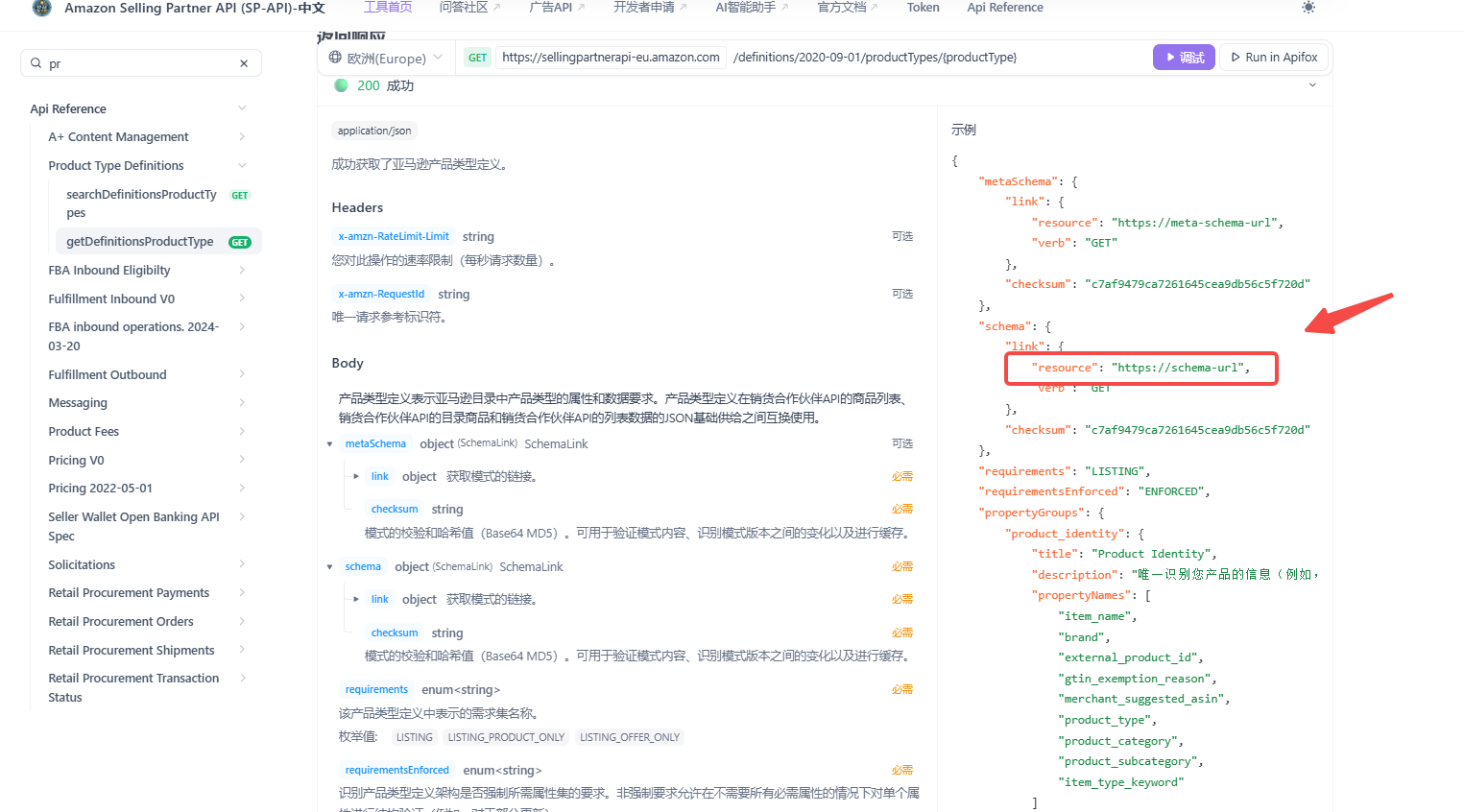
json schema里找的
具体,通过getDefinitionsProductType获取schema,然后找到里面的varint_theme(这里拼写可能错误,你搜theme) 就能看到枚举
https://api.sp-api.net/zh/api-308929921
image.png

官方 SDK 并不强制你用 refresh_token 去换 token——如果你手里已经有一个仍然有效的 LWA access_token,只要把它放进请求头 x-amz-access-token 即可;这是官方文档现在推荐的做法(最近文档里甚至给了“不带签名、只带 header”的示例)

下面给你两条常见路径,按需选:

方案 A:直接用 HTTP(最省事)

curl "https://sellingpartnerapi-na.amazon.com/sellers/v1/marketplaceParticipations" \
  -H "x-amz-access-token: Atza|<你的token>" \
  -H "user-agent: MyApp/1.0 (Language=CLI)" \
  -H "x-amz-date: 20250101T120000Z"
官方“Connect to the SP-API”页面明确列出要加的头,示例也展示了不带签名、只带 x-amz-access-token 的请求。注意 token 有效期约 1 小时。

方案 B:仍然用官方 SDK,但给底层 HTTP 客户端统一加默认头

不同语言的官方 SDK 都是基于 OpenAPI 生成的客户端,底层一般都有“默认请求头/拦截器”的注入点。思路是:x-amz-access-token 当成普通自定义头塞进去即可。

Java(OkHttp 拦截器)

import okhttp3.*;
import com.amazon.spapi.client.*;   // 你的生成包名可能不同
import com.amazon.spapi.api.SellersApi;

String accessToken = "Atza|...";
ApiClient client = new ApiClient();
OkHttpClient http = client.getHttpClient().newBuilder()
  .addInterceptor(chain -> {
    Request req = chain.request().newBuilder()
      .header("x-amz-access-token", accessToken)
      .header("user-agent", "MyApp/1.0 (Language=Java)")
      .build();
    return chain.proceed(req);
  }).build();
client.setHttpClient(http);
client.setBasePath("https://sellingpartnerapi-na.amazon.com");

SellersApi api = new SellersApi(client);
var res = api.getMarketplaceParticipations();
官方 Java 教程默认演示用 refresh_token 让 SDK 自己换 token;但如果你已持有 access_token,也可以像上面这样直接注入 header 使用。(developer-docs.amazon.com)

C#(RestSharp/Configuration 默认头)

using Amazon.SellingPartnerAPIAA.Client; // 你的命名空间可能不同
using Amazon.SellingPartnerAPIAA.Api;

var cfg = new Configuration { BasePath = "https://sellingpartnerapi-na.amazon.com" };
cfg.AddDefaultHeader("x-amz-access-token", "Atza|...");
cfg.UserAgent = "MyApp/1.0 (Language=C#)";

var api = new SellersApi(cfg);
var res = api.GetMarketplaceParticipations();
C# 的生成客户端通常支持在 Configuration/RestClient 上添加默认头;把 token 放进 x-amz-access-token 即可。官方“生产调用”页面也列出必需的几个头部。

Python(ApiClient 默认头)

from spapi_client import Configuration, ApiClient, SellersApi  # 你的包名/类名可能不同

cfg = Configuration()
cfg.host = "https://sellingpartnerapi-na.amazon.com"
api_client = ApiClient(cfg)
api_client.set_default_header("x-amz-access-token", "Atza|...")
api_client.set_default_header("user-agent", "MyApp/1.0 (Language=Python)")

api = SellersApi(api_client)
res = api.get_marketplace_participations()
Python 的生成客户端一般提供 set_default_header 或可直接修改 default_headers 添加自定义头。

Node/JS(直接 fetch;或在 SDK 的请求钩子里加头)

const r = await fetch(
  "https://sellingpartnerapi-na.amazon.com/sellers/v1/marketplaceParticipations",
  {
    headers: {
      "x-amz-access-token": "Atza|...",
      "user-agent": "MyApp/1.0 (Language=Node)",
      "x-amz-date": "20250101T120000Z",
    },
  }
);
const data = await r.json();
官方文档与 Postman 教程都明确需要把 access_tokenx-amz-access-token 传入(有时文档里也能看到旧写法 x-amzn-access-token,本质一致)。

重要注意

  • RDT 场景:访问带 PII 的“受限接口”时,不用 LWA access_token,而是先用 Tokens API 换 RDT,然后仍然把 RDT 放在 x-amz-access-token 头里。
  • 有效期:LWA access_token 通常有效 1 小时,过期会 401;如果你有 refresh_token,让 SDK 代换会更省心。

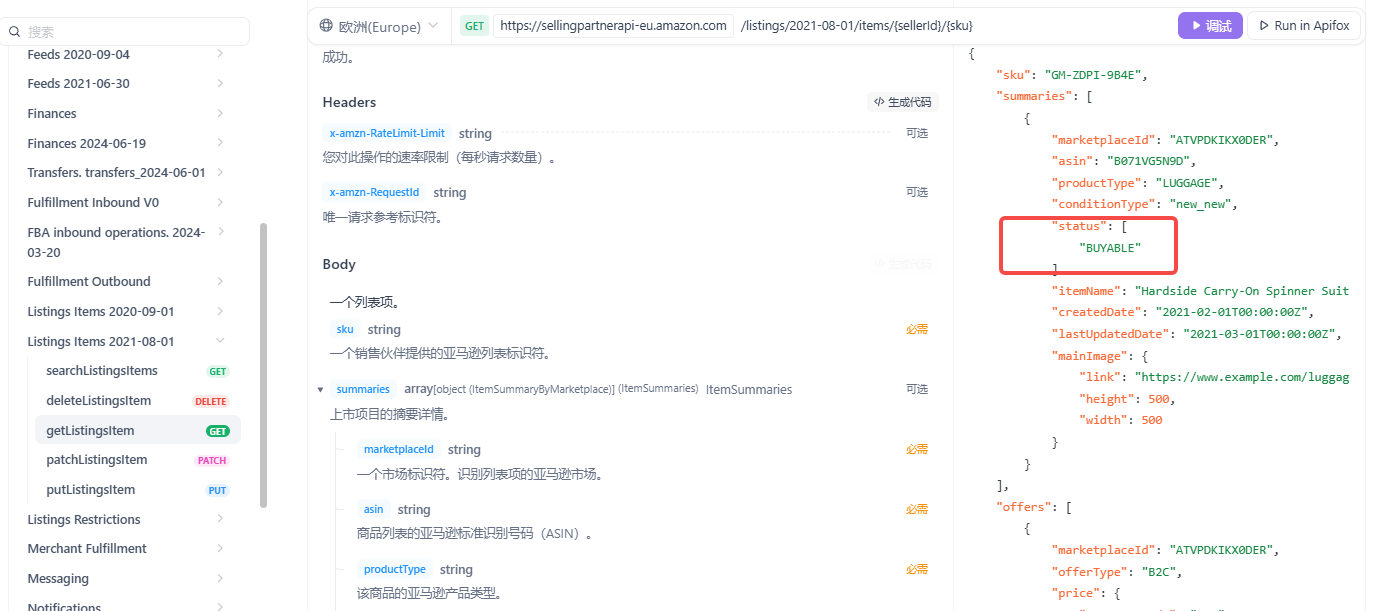
使用SP-API刊登的,主要关注商品前台链接是否正常。以及 issue里是否有错误即可

如果前台链接可以购买,可以搜索,拿这些就可以忽略

使用getListingItem接口看看
https://api.sp-api.net/zh/api-308930030
image.png

技术可以实现的,大概涉及到下面的相关接口
Amazon Shipping API v2
Fulfillment Outbound API v2020-07-01
Orders API v0
Notifications API

emm,这个你可以发个帖子,报个价,或者在这里报价格,然后看看有哪个人愿意搞一下

绩效报告里有GET_V2_SELLER_PERFORMANCE_REPORT
https://developer-docs.amazon.com/sp-api/docs/report-type-values-performance

accountStatuses
marketplaceId
status
performanceMetrics
lateShipmentRate
reportingDateRange
reportingDateFrom
reportingDateTo
status
targetValue
targetCondition
orderCount
lateShipmentCount
rate
invoiceDefectRate
reportingDateRange
reportingDateFrom
reportingDateTo
status
targetValue
targetCondition
invoiceDefect
status
count
missingInvoice
status
count
lateInvoice
status
count
orderCount
rate
orderDefectRate
afn
reportingDateRange
reportingDateFrom
reportingDateTo
status
targetValue
targetCondition
orderWithDefects
status
count
claims
status
count
chargebacks
status
count
negativeFeedback
status
count
negativeFeedback
status
count
orderCount
rate
fulfillmentType
mfn
orderWithDefects
status
count
claims
status
count
chargebacks
status
count
negativeFeedback
status
count
negativeFeedback
status
count
orderCount
rate
fulfillmentType
onTimeDeliveryRate
reportingDateRange
reportingDateFrom
reportingDateTo
status
targetValue
targetCondition
shipmentCountWithValidTracking
onTimeDeliveryCount
rate
unitOnTimeDeliveryRate
reportingDateRange
reportingDateFrom
reportingDateTo
status
targetValue
targetCondition
unitOnTimeDeliveryCount
totalUnitCount
rate
validTrackingRate
reportingDateRange
reportingDateFrom
reportingDateTo
status
targetValue
targetCondition
shipmentCount
validTrackingCount
rate
preFulfillmentCancellationRate
reportingDateRange
reportingDateFrom
reportingDateTo
status
targetValue
targetCondition
orderCount
cancellationCount
rate
warningStates
accountHealthRating
ahrStatus
reportingDateRange
reportingDateFrom
reportingDateTo
listingPolicyViolations
reportingDateRange
reportingDateFrom
reportingDateTo
status
targetValue
targetCondition
defectsCount
productAuthenticityCustomerComplaints
reportingDateRange
reportingDateFrom
reportingDateTo
status
targetValue
targetCondition
defectsCount
productConditionCustomerComplaints
reportingDateRange
reportingDateFrom
reportingDateTo
status
targetValue
targetCondition
defectsCount
productSafetyCustomerComplaints
reportingDateRange
reportingDateFrom
reportingDateTo
status
targetValue
targetCondition
defectsCount
receivedIntellectualPropertyComplaints
reportingDateRange
reportingDateFrom
reportingDateTo
status
targetValue
targetCondition
defectsCount
restrictedProductPolicyViolations
reportingDateRange
reportingDateFrom
reportingDateTo
status
targetValue
targetCondition
defectsCount
suspectedIntellectualPropertyViolations
reportingDateRange
reportingDateFrom
reportingDateTo
status
targetValue
targetCondition
defectsCount
foodAndProductSafetyIssues
reportingDateRange
reportingDateFrom
reportingDateTo
status
targetValue
targetCondition
defectsCount
customerProductReviewsPolicyViolations
reportingDateRange
reportingDateFrom
reportingDateTo
status
targetValue
targetCondition
defectsCount
otherPolicyViolations
reportingDateRange
reportingDateFrom
reportingDateTo
status
targetValue
targetCondition
defectsCount

涉及到评论的接口,只有这几个,参考文档地址:https://api.sp-api.net/zh/api-346686042

  • 商品:getItemReviewTopics
  • 分类节点:getItemBrowseNode

- 评论趋势 getItemReviewTrends 获取某个商品过去六个月的正面和负面评价趋势。
- ...等等

不过上面的并不是产品的所有评论,而是亚马逊分析之后的评论总结

image.png

这个是根据SP-API的邀请评论接口做的功能,createProductReviewAndSellerFeedbackSolicitation
接口地址:https://api.sp-api.net/zh/api-308930157
image.png

另外还有一个获取功能getSolicitationActionsForOrder
https://api.sp-api.net/zh/api-308930156

现在还不用,直接下一步,填写企业信息,联系人信息,然后上传证件就可以了。
他们会根据填写到资料看看是否需要提交一份视频

recommended_browse_nodes,你在schema搜一下这个属性相关的看看传了没

私有(Private)应用的自授权上限是 10 个,这是按应用(application-level)计算的,不是按“同一营业执照/主体的店铺数”来限定。私有应用只能做自授权,超过 10 个就无法再新增授权,除非改为公开(Public)应用或移除已有的自授权

官方链接是:https://developer-docs.amazon.com/sp-api/docs/application-authorization-limits

image.png

赔偿(补偿)

  • FBA 赔偿报表GET_FBA_REIMBURSEMENTS_DATA(Reports API)。包含每条赔偿及原因,日更。(Amazon 开发者文档)
  • 财务事件(含 SAFE-T 赔偿、移除运费等)

    • 旧版:Finances v0 的 listFinancialEvents* 可返回事件类型(如 SAFETReimbursementEventRemovalShipmentEvent)。(Spapi.vip)
    • 新版:Finances v2024-06-19listTransactions 汇总交易(v0 正在弃用,需迁移到 v2024-06-19)。(Amazon 开发者文档)

盘存(库存)

  • FBA Inventory APIgetInventorySummaries 获取仓网内库存汇总/明细。(Amazon 开发者文档)
  • 常用库存报表(Reports API)

    • GET_AFN_INVENTORY_DATA(亚马逊履约库存快照)
    • GET_RESERVED_INVENTORY_DATA(预留库存)
    • GET_FBA_MYI_UNSUPPRESSED_INVENTORY_DATA / GET_FBA_MYI_ALL_INVENTORY_DATA(在售/含归档库存明细)
      以上均在“FBA Inventory Reports”页列出。(Amazon 开发者文档)

月仓储费

  • FBA 仓储费报表GET_FBA_STORAGE_FEE_CHARGES_DATA(可请求或定时,含每 ASIN 当月预计仓储费、费率等字段)。(Amazon 开发者文档)

长期仓储费(LTSF)

  • FBA 长期仓储费扣费报表GET_FBA_FULFILLMENT_LONGTERM_STORAGE_FEE_CHARGES_DATA(按月生成,含收费数量、金额、年龄层等)。(Amazon 开发者文档)

移除订单

  • 移除订单明细报表GET_FBA_FULFILLMENT_REMOVAL_ORDER_DETAIL_DATA(含订单行、数量、费用、状态,近实时)。(Amazon 开发者文档)
  • 移除货件跟踪报表GET_FBA_FULFILLMENT_REMOVAL_SHIPMENT_DETAIL_DATA(承运商、跟踪号、发货数量等)。(Amazon 开发者文档)
  • 财务事件(移除相关费用):Finances 事件中的 RemovalShipmentEvent。(Spapi.vip)

换货订单(Replacement)

  • Orders API 字段getOrder / getOrders 返回 IsReplacementOrderReplacedOrderId 等,用于识别换货单。(Amazon 开发者文档)
  • FBA 换货报表GET_FBA_FULFILLMENT_CUSTOMER_SHIPMENT_REPLACEMENT_DATA(列出已发出的换货,NA/IN 可用)。(Amazon 开发者文档)

快速选型建议

  • 需要“交易/扣费明细”(含赔偿、移除费):优先用 Finances v2024-06-19 listTransactions(官方在逐步替代 v0)。(Amazon 开发者文档)
  • 需要“库存/仓储费/移除/换货的批量明细”:走 Reports API 对应 reportType(上面已列)。(Amazon 开发者文档)
  • 需要“实时库存快照/变更”:走 FBA Inventory getInventorySummaries。(Amazon 开发者文档)

发布
问题

公众
平台

最新资讯发布